I have two kids, and I want them to build good habits. The usual way is nagging, and nagging works badly. So I asked what would make the habits more interesting to them, and the answer was a bit of money and a bit of a game.
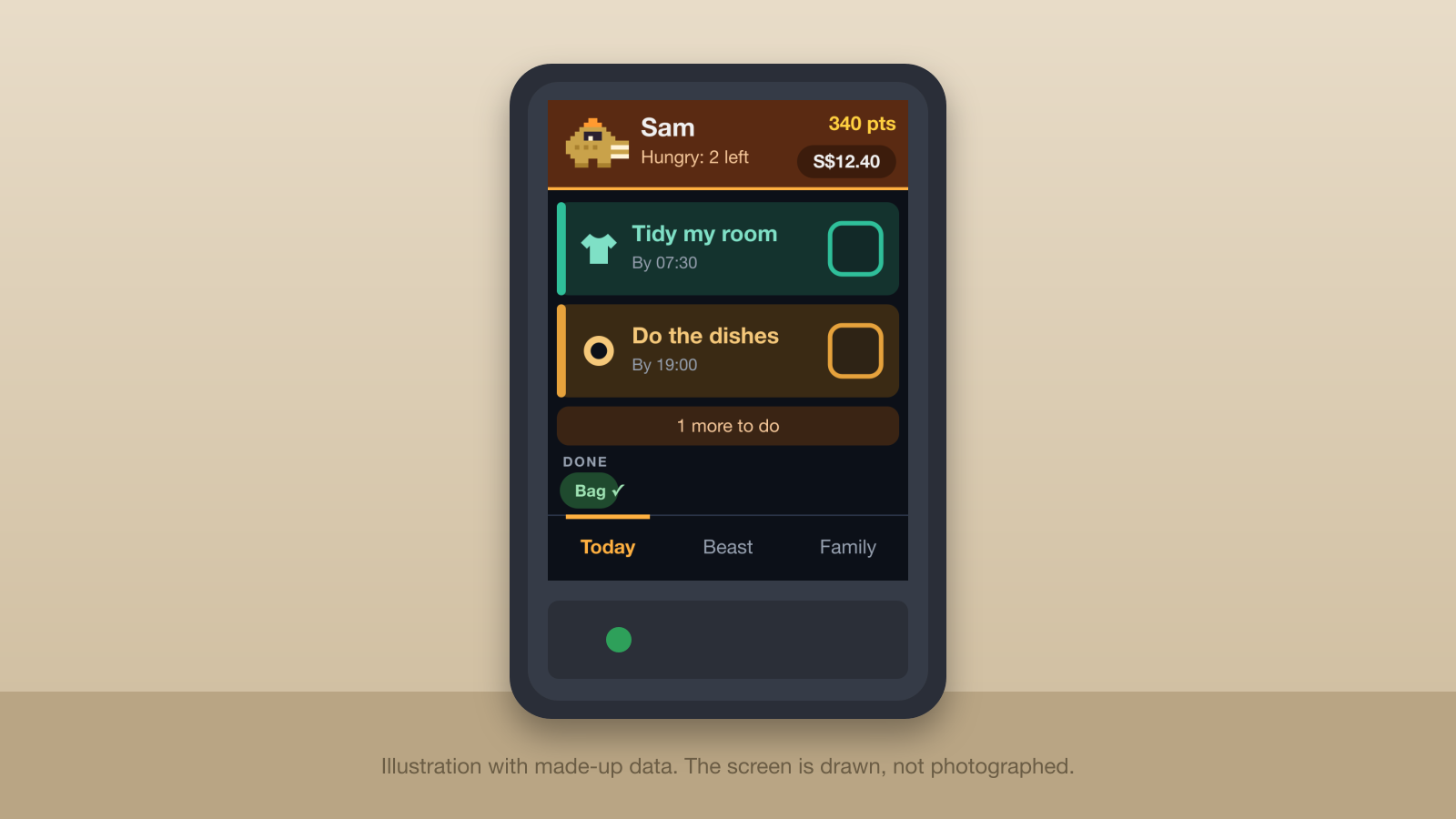
Each kid now has a small touch screen on their desk. They tap a habit when it is done. The ticks go to a ledger I run on Cloudflare, the ledger works out the week's pocket money, and a creature on the screen grows when they keep at it.
I will also admit that I love building things like this, and it was a good excuse to build one. The Cheap Yellow Display is a very fun board.
It started life as a chore tracker. A day in I changed the name and the idea, and that change shaped everything else. More on that below.
A note on the screenshots
I did not photograph anything. Every screen on this page is a drawing I made to match the layout and colours of the real firmware and the real portal, with made-up names and numbers. The kids in the screens are called Sam and Alex, which are not their names. The habits shown are examples, since the real list is for us to know. The creatures and their names are the real ones from the firmware.
What it does
The screen has three tabs along the bottom. Today is where a kid spends about ten seconds a day.
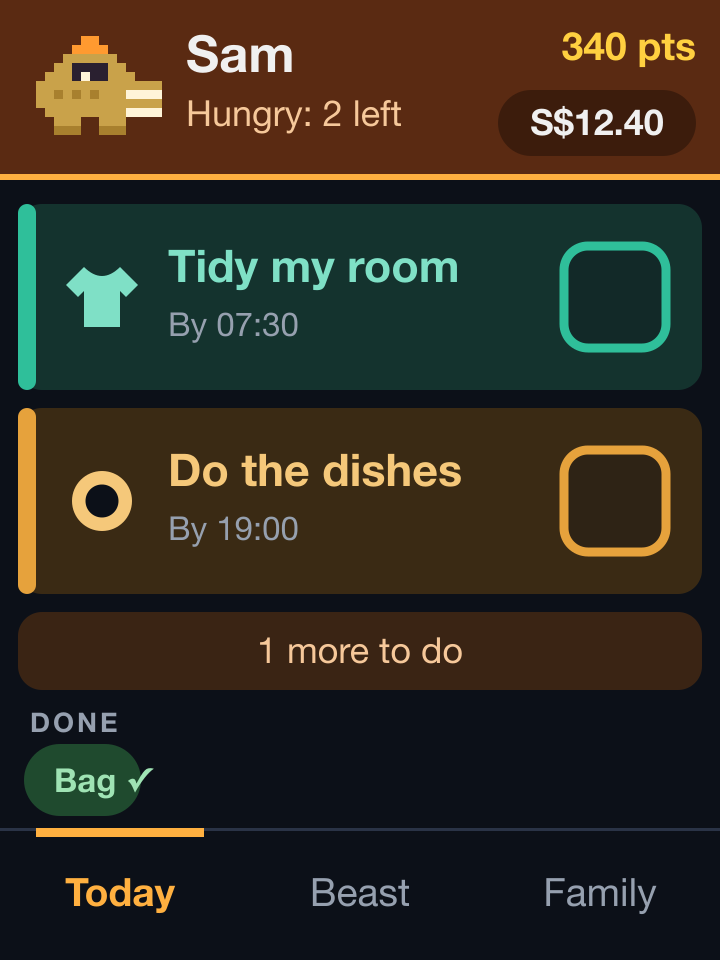
- 1Their creature. It sits in the header, takes the kid's colours and says what it wants. Here it is hungry because two habits are still open.
- 2Points. Effort, kept apart from money.
- 3Pocket money. What the household owes them. Tap it to record that they spent some.
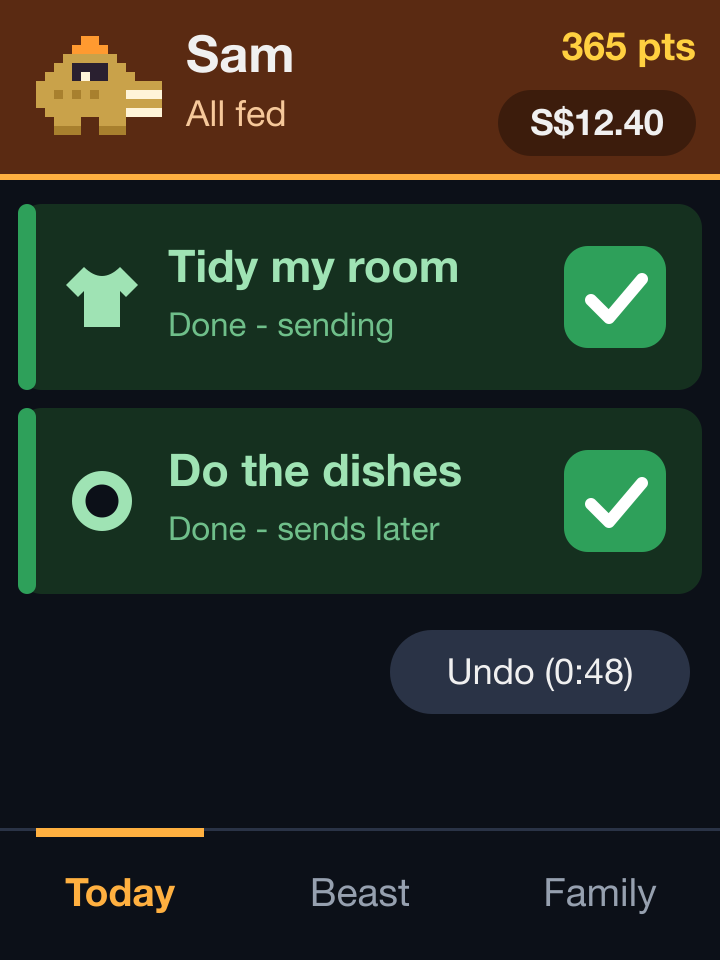
- 4The tick. One tap on the card ticks the habit. It shows as done at once and is sent in the background.
- 5The rest. Three cards fit on a page. Anything more waits behind this bar.
- 6Done. Finished habits shrink to small chips at the bottom.
- 7Tabs. Today, Beast and Family. A tab left alone goes back to home after a minute.
A few things happen without anyone asking.
- It knows which habits are due. The server holds the school calendar, so on a holiday a school-day habit does not show up.
- A late tick still counts. Tick after the window and it counts that day, marked as late. I wanted a kid who forgot to still get the credit, and I can see in the ledger if late becomes a pattern.
- Undo lasts a minute. A mis-tap shows an Undo button on the card for sixty seconds.
- A tick can carry a detail. Some habits take an optional extra, such as how long it took. It is never required, so a tick stays one tap.
The LED on the board is red while something is still open and green once everything is ticked. When the list is done, the creature's den becomes the home screen.
How it fits together
The screens are as dumb as I could make them. A board holds no points, no money and no rules. It asks one authenticated endpoint what today looks like and draws the answer, and it sends each tap back as a small request with a key that stops it counting twice.
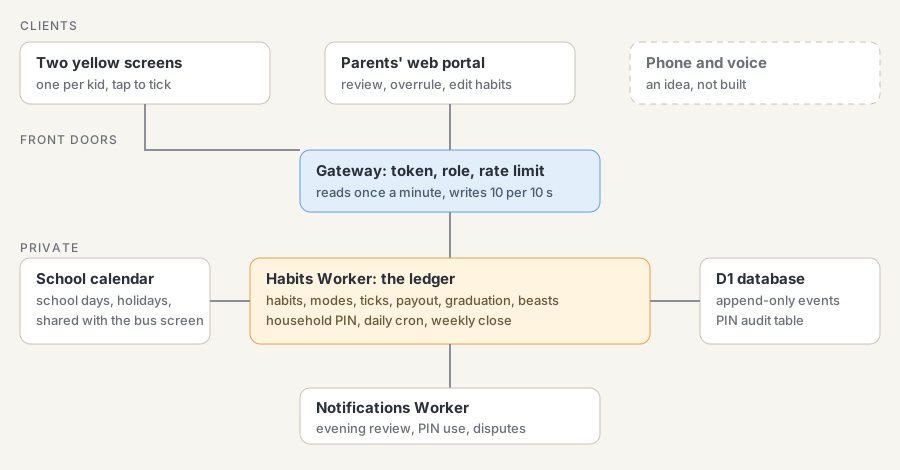
This sits on the small platform I describe in the maker platform write-up. The habits part is one private Worker with its own database. Four ideas shaped it.
- A ledger, not a balance. Every tick, miss, overrule, merit, payout and purchase is an append-only event. Balances are sums. The database refuses updates and deletes on that table. A kid can always ask why their number changed and the answer is a list.
- One place for the truth. Boards keep only a queue of taps waiting to be sent. The portal and the screens write to the same ledger, and the server's clock decides which window a tap belongs to, not the board's.
- Rules are data. The payout rule and the graduation thresholds are plain JSON, and each result stores the rule it used. If I change the rule next month, last month does not get re-priced.
- Roles at the front door. A kid's screen can tick their own habits and record their own spending. It cannot overrule, record a miss or hand out merits. The gateway checks that, and the habits Worker checks it again.
The household PIN
There is one deliberate exception. A parent standing at a kid's screen can type a household PIN to overrule a tick, record a miss or give a demerit on the spot, for that kid only. Every attempt is written to its own audit table and I get a notification when one succeeds. Refused attempts are batched to one notification per screen per hour, and five wrong entries lock that screen's PIN for the rest of the hour.
I considered heavier protection and decided against it. A small household and a system that is a pain will not get used.
Hardware
Each screen is an ESP32-2432S028, known online as a Cheap Yellow Display or CYD.
- A 2.8-inch 240 by 320 colour display on an ESP32 with 4 MB of flash.
- A resistive touch panel. It needs calibration and works with a stylus.
- An RGB LED, a light sensor and a small speaker connector.
- One USB port for flashing and power. The screens run from the wall, so there is no battery.
- A 3D-printed case from this MakerWorld model. It was designed for a weather station, but it takes the same board.
Both of mine turned out to have an ST7789 display rather than the ILI9341 most guides assume, and the colours are wired blue-green-red. The board's pin map and variants are written up in the community repository linked above.
The case
I printed the case from the Atmos model. It is a weather-station enclosure that takes a Cheap Yellow Display. The firmware does not care what the box looks like, only where the touch screen sits.
Habits, not chores
My first version was a chore tracker, with a chore as a job somebody has to do. After a day I rewrote the idea. A habit is something that eventually happens without anyone thinking about it, so a system built around habits should ask for less over time. It should never turn into a job of its own.
The habits themselves are plain ones, like tidying a room or doing the dishes. That produced three modes for each habit, and each kid has their own mode for each habit.
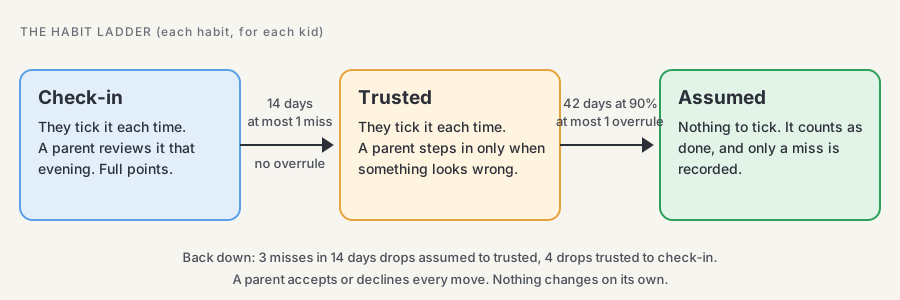
A new habit starts in check-in. The kid ticks it and I look at the tick in a short evening review, usually with one tap on "all fine". Once they have kept it for a couple of weeks, the system suggests trusted, where I only step in when something looks wrong. After about six more weeks it suggests assumed. In assumed mode the habit leaves their list altogether. It counts as done unless somebody records a miss.
I wrote the thresholds from the 66-day median in the habit-formation study linked above. A new habit takes about eight weeks to reach assumed, and nothing moves without a parent accepting the suggestion. If a habit slips, it can go back down, and the wording to the kid is plain, like "Tidy room is back on your list for a while".
I added three limits to keep it from becoming a chore of its own.
- No more than three habits in check-in per kid at once.
- A broken streak resets quietly, and the best streak stays on display.
- If nobody opens the portal for a week, I review the setup with the kids. I do not add reminders.
The parents' portal
Most of the management happens on a web portal, not on the screens. It is a plain server-rendered site that works on a phone, since that is where I use it. Each parent has their own login, and every change it makes is recorded under that parent's name.
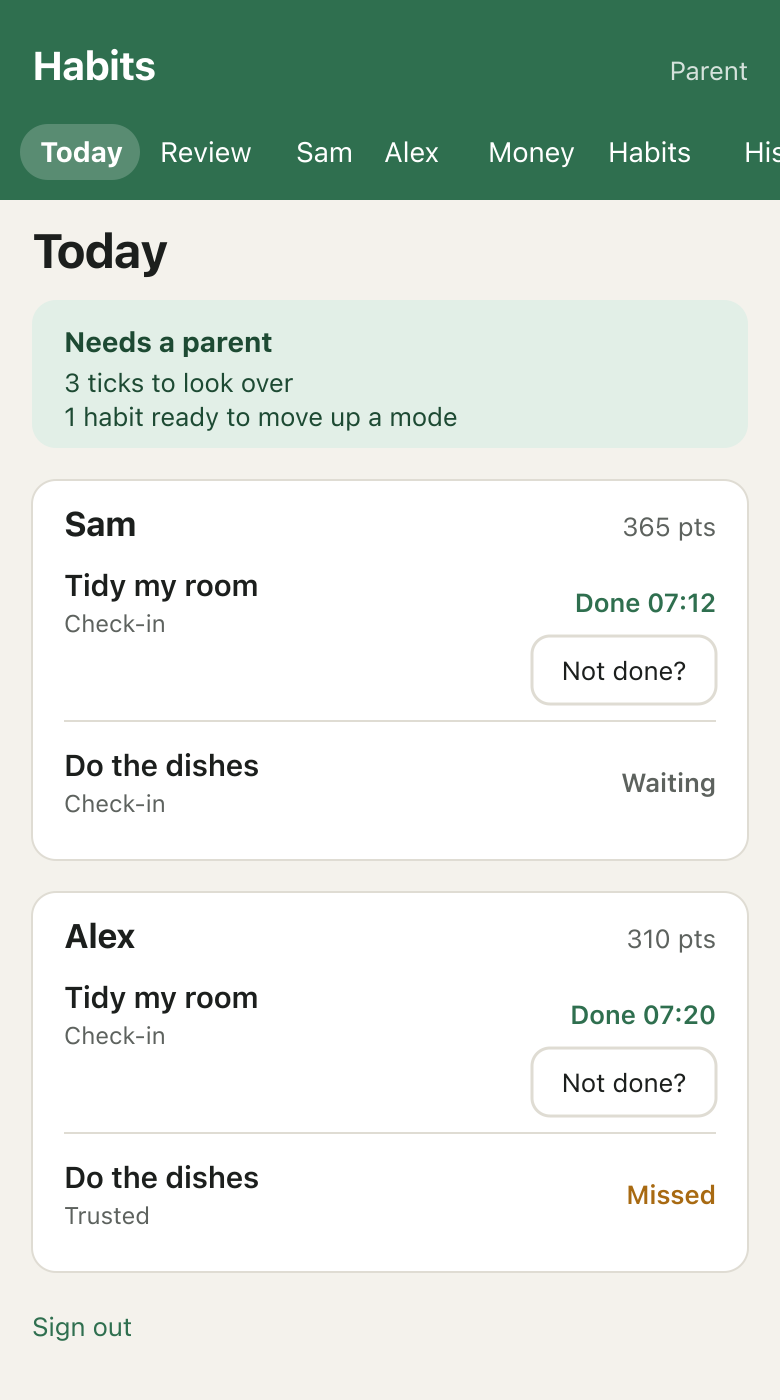
The Today page shows each kid's habits and what needs a parent, which means ticks to look over and habits ready to move up a mode. Each tick has a "Not done?" button for when something is clearly wrong.
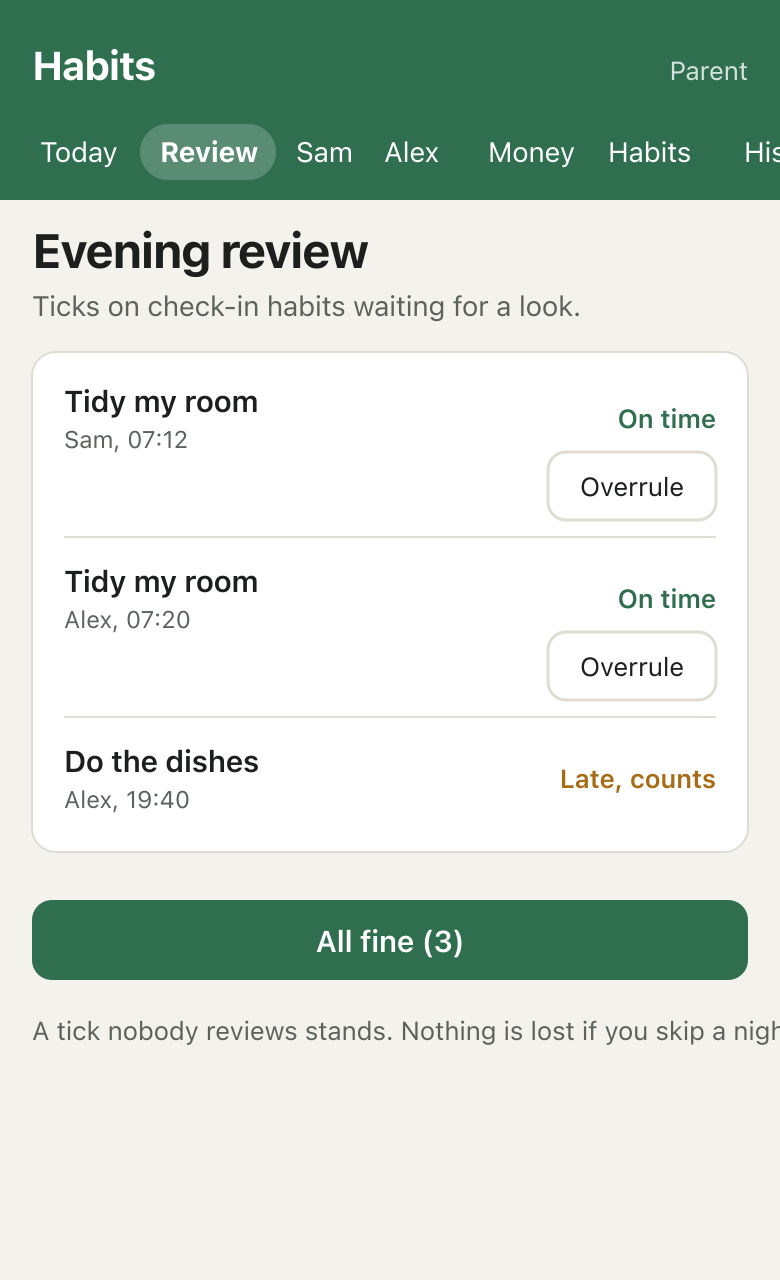
The evening review is the heart of check-in mode. It lists the ticks on check-in habits. A tick I do not review stands, so a busy night never costs a kid anything. I can overrule one, and the kid can answer with a note, which I settle later.
The same site holds the rest of the setup. A page per kid takes merits and demerits, goals and added money. The Money page shows balances and how the week is going. The Habits page edits every field a habit has.
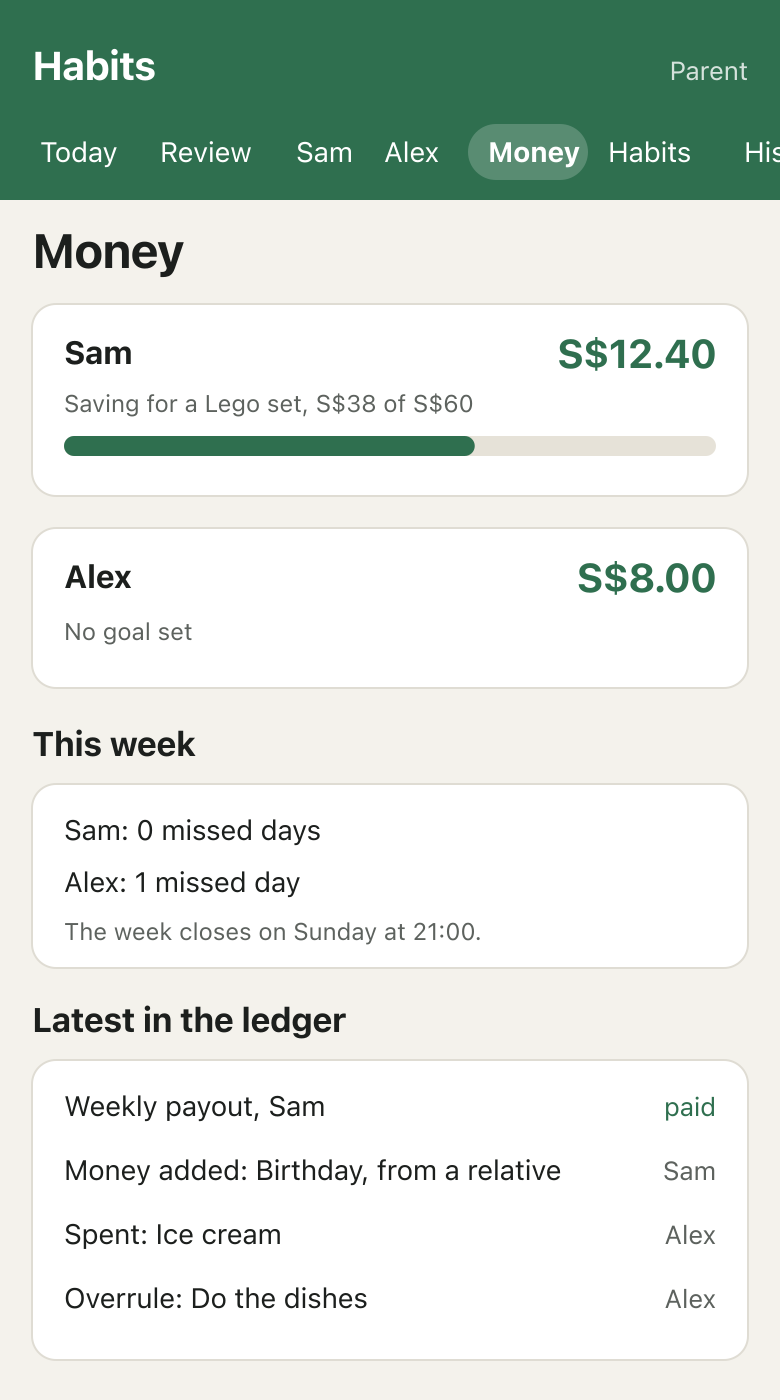
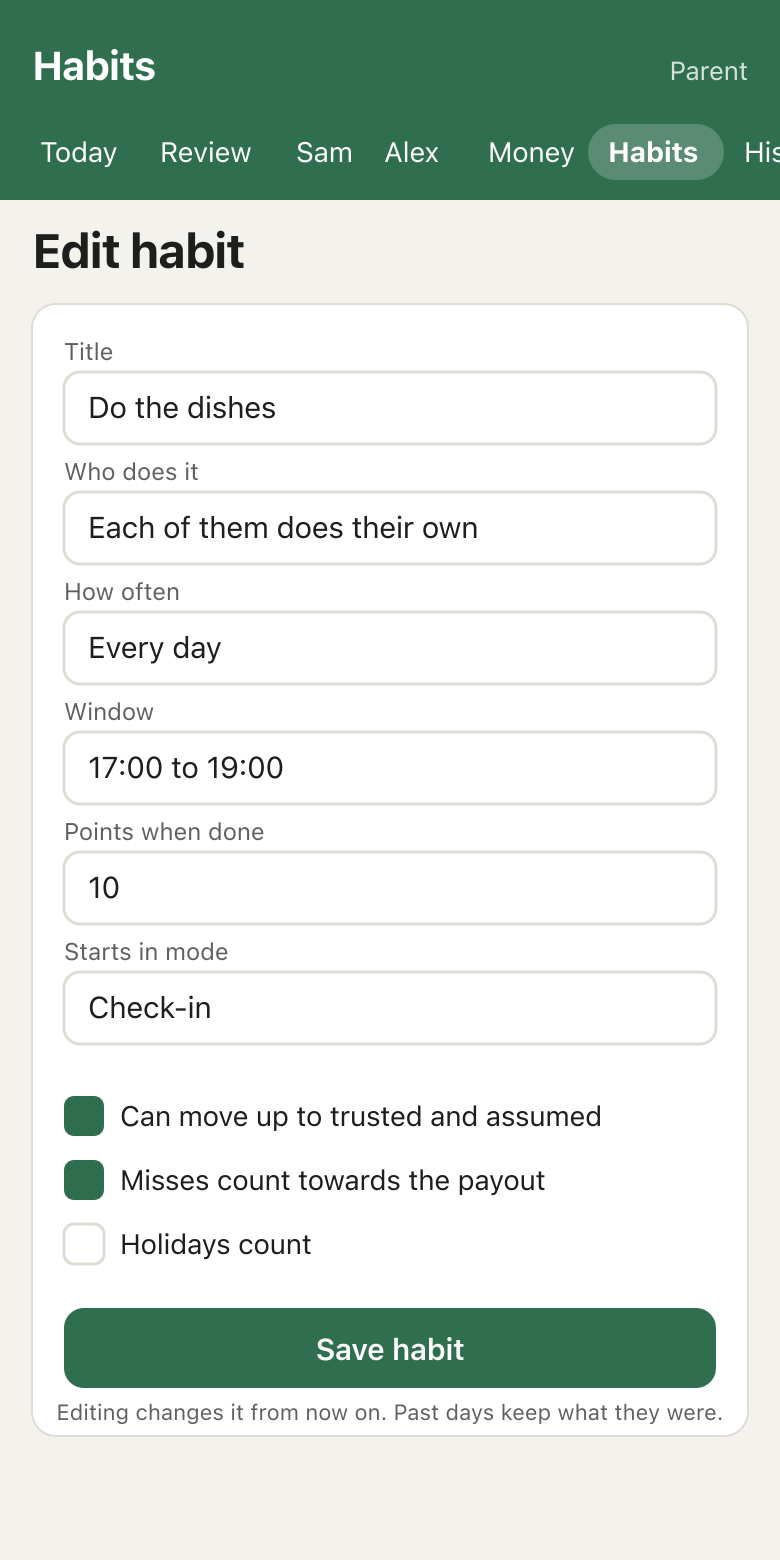
All of it is made-up data in a drawing of the real pages. Editing a habit changes it from then on, while past records keep what they were, so I can tune things without rewriting history.
Pocket money
Pocket money follows from the ticks. Missed days reduce the week's amount, and it never goes below zero. The week closes on Sunday at 21:00. The ledger only records money and nothing moves real cash. I hold the cash.
I plan to start gently. Some habits can be left out of the payout while a kid settles in, and turning that on later is a setting, not a code change. Paying children for something they might come to enjoy can make it feel like a job, so I want that to be a decision I make habit by habit.
Points and money are separate on purpose. Points measure effort, and whether they ever convert to money is still undecided.
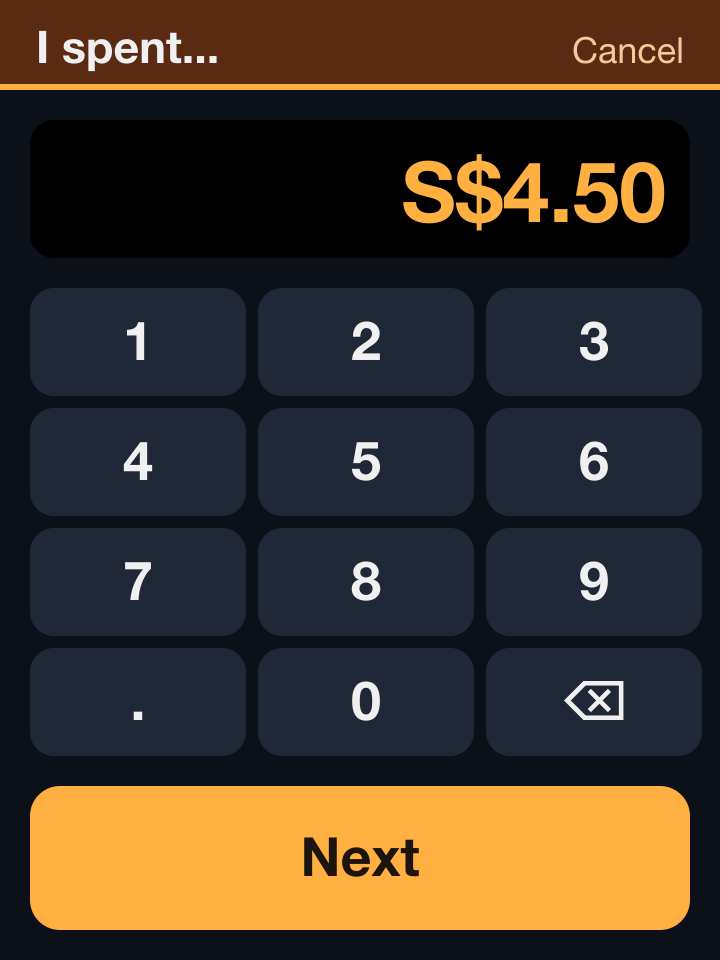
A kid can record their own spending from the board. They tap the amount on a keypad, pick what it was for from a short list, check it and tap Record. It can take the balance below zero, and I get told. Mistakes are fixed by a parent on the portal, since the screen has no undo for money.
The creature
The ticks feed a creature. I got the idea from the Tamagotchi, and I wanted something that rewards steady habits without piling on a second set of chores.
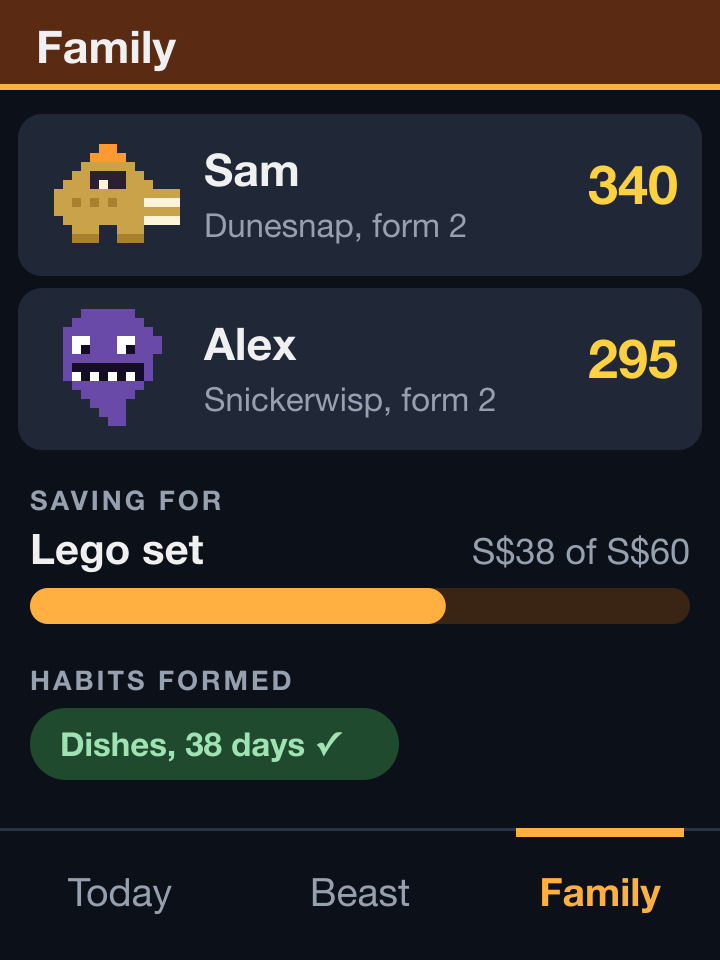
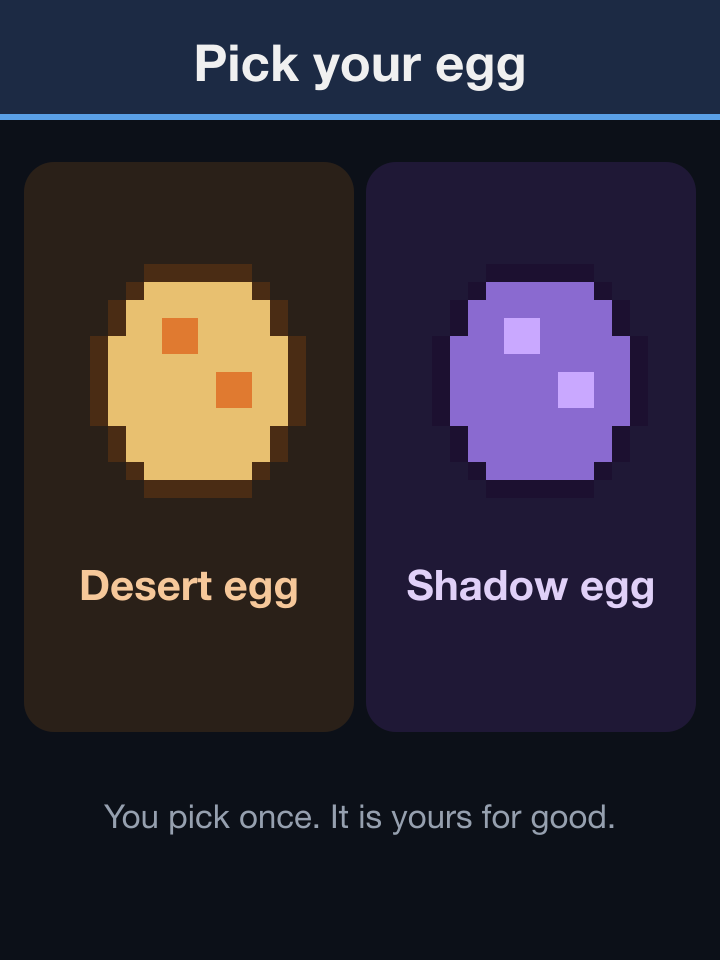
Each kid picks an egg once, and it is theirs for good. Each kid's favourite Pokémon inspired their creature, and I made them different enough to be their own things. One is a desert crocodile with a dark visor and a sun crest. The other is a grinning shadow that floats on a smoky tail.
- Growth comes from points, and it never goes down while the creature lives.
- Care, from 0 to 100, follows how steadily and honestly they record their habits. An on-time tick feeds it most and a late tick a little less. A tick that a parent later overrules costs more than an honest miss, so it pays to be truthful.
- Evolving needs growth, care and enough good days in the last 14, so points alone never evolve it. There are four forms. The egg hatches on about day two, the second form arrives after about two weeks and the last after about seven.
- Shiny is earned, not random. Four perfect weeks in a row make a creature shiny for life.
- Dying is possible and hard. It takes seven due days in a row ending with care at zero, after three or four fully forgotten days to reach zero in the first place. While a creature is ill, the screen says how many days are left. A new egg follows, and the screen remembers the one before.
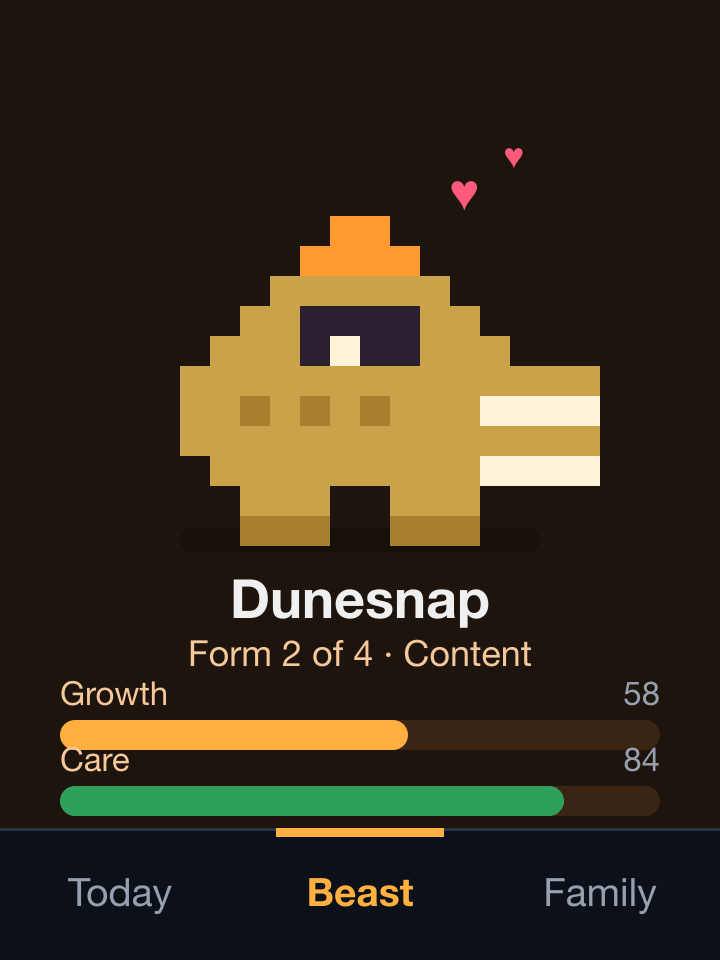
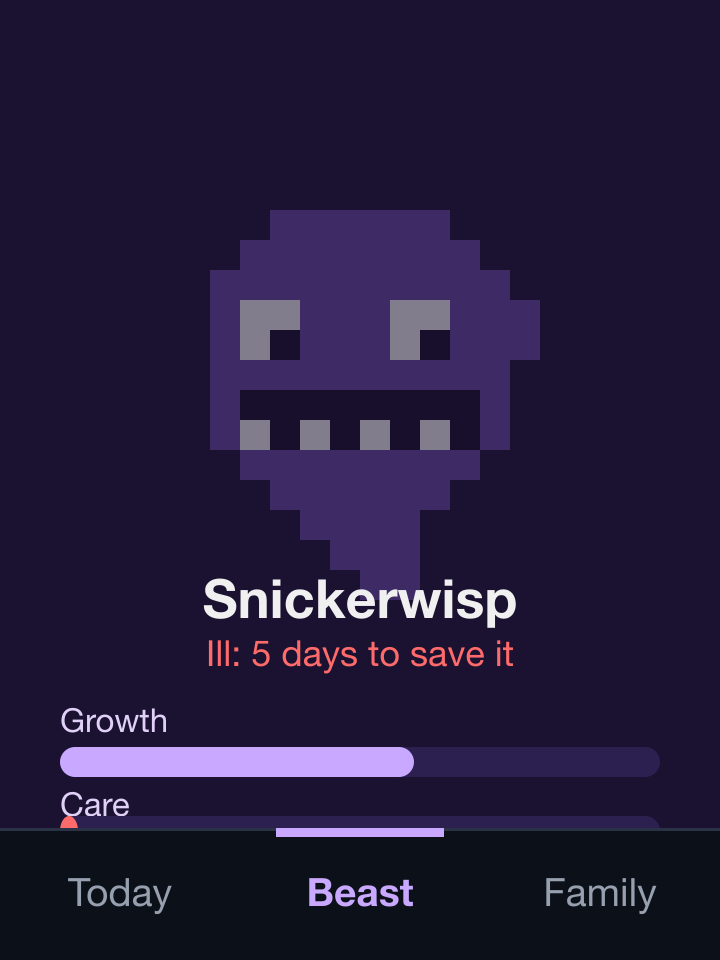
Feeding is ticking, and that is all. There is nothing else to look after, so the creature adds no chores. Tapping it is just for fun. The kids also see each other's points and creatures on the Family tab.
Problems worth remembering
The display is not the one in most guides. Both boards use an ST7789 controller, not the ILI9341 that most CYD examples assume. It ignores the ILI9341 ID command, and its colours come out blue-green-red. The bring-up app I wrote first draws labelled colour bars so I can see at a glance whether a new board is wired the way I think.
The two touch panels are different. One reads near zero pressure at rest and is even across the glass. The other reads about 650 at rest and bends towards its corners. For that one, touch now ignores the resting reading, and a five-tap calibration fits a correction that follows the bend. The lesson is to calibrate each board, not to copy settings.
The screen froze whenever Wi-Fi hiccuped. The first version made its network calls on the same loop that handles touch. A slow request meant a dead screen. Requests now run on their own task on the second core, one at a time over one kept connection, and a tick shows as done at once.
One tap a minute would have been useless. The platform's gateway originally allowed one request a minute per device, which would refuse a kid ticking three habits in a row. Reads still stay at one a minute, and writes now get their own limit of 10 per 10 seconds.
Taps can arrive late or twice. When the Wi-Fi drops, taps queue with idempotency keys and show as "sends later". A retry can never count twice, and the queue survives a restart because it lives in flash.
The light sensor barely moves. It reads 0 in a lit room and only reaches the tens when covered. Night mode therefore also follows the clock, from 22:00 to 06:00, instead of trusting the sensor alone.
Fairness is hard to write down. My first draft made a missed window a miss. Then I decided a late tick should count and reverse it. An overrule after the week is paid is settled at the next weekly close. Each of these was a conversation, and each ended up as a setting rather than a rule baked into the code.
How it grew
- 15 October 2026. The first backend, the chore ledger and the weekly payout, built and tested locally.
- 16 October 2026. Renamed to habits, with modes, check-in review, graduation and an optional detail on a tick. The same day came the public contract, the gateway routes and roles, the household PIN, deployment to production, the parents' portal and the first firmware for the yellow boards. Both boards were flashed and reading their real summaries by the end of the day.
- 17 October 2026. The creature, a redesigned screen with tabs and the den, and background sending so a tap never freezes the screen.
What's next
The real test starts on Monday 19 October, when the habits first fall due. I will sit with the kids and look at the screens together. We agreed to review everything after four weeks of use.
Still open are whether the kids can nominate each other for merits, whether another adult may ever approve a tick, and whether assumed habits should earn points day to day. Further out are an evening notification for the review, an LED matrix for the household streak, borrowing from the parents, and an iPhone app or Siri shortcuts to tick a habit by voice.