The Systems Iceberg helps a class look past one event to what keeps causing it. You write what happened at the tip, then work down through the layers below the waterline: the patterns over time, the structures behind them, and the mental models that hold those structures in place. A tutor group might start from "Half the class missed the homework deadline" and end up talking about how three subjects set homework on the same night.
Where your data goes
Your iceberg is kept in this browser as you work, so it is still there when you come back. Save keeps a copy under a name you choose. Saved copies are included in Backup & Restore, and in sync if you have turned it on. A share link holds the whole iceberg, so nothing is uploaded and nobody needs an account. If you clear the browser's data, you lose anything you have not backed up.
Quick start
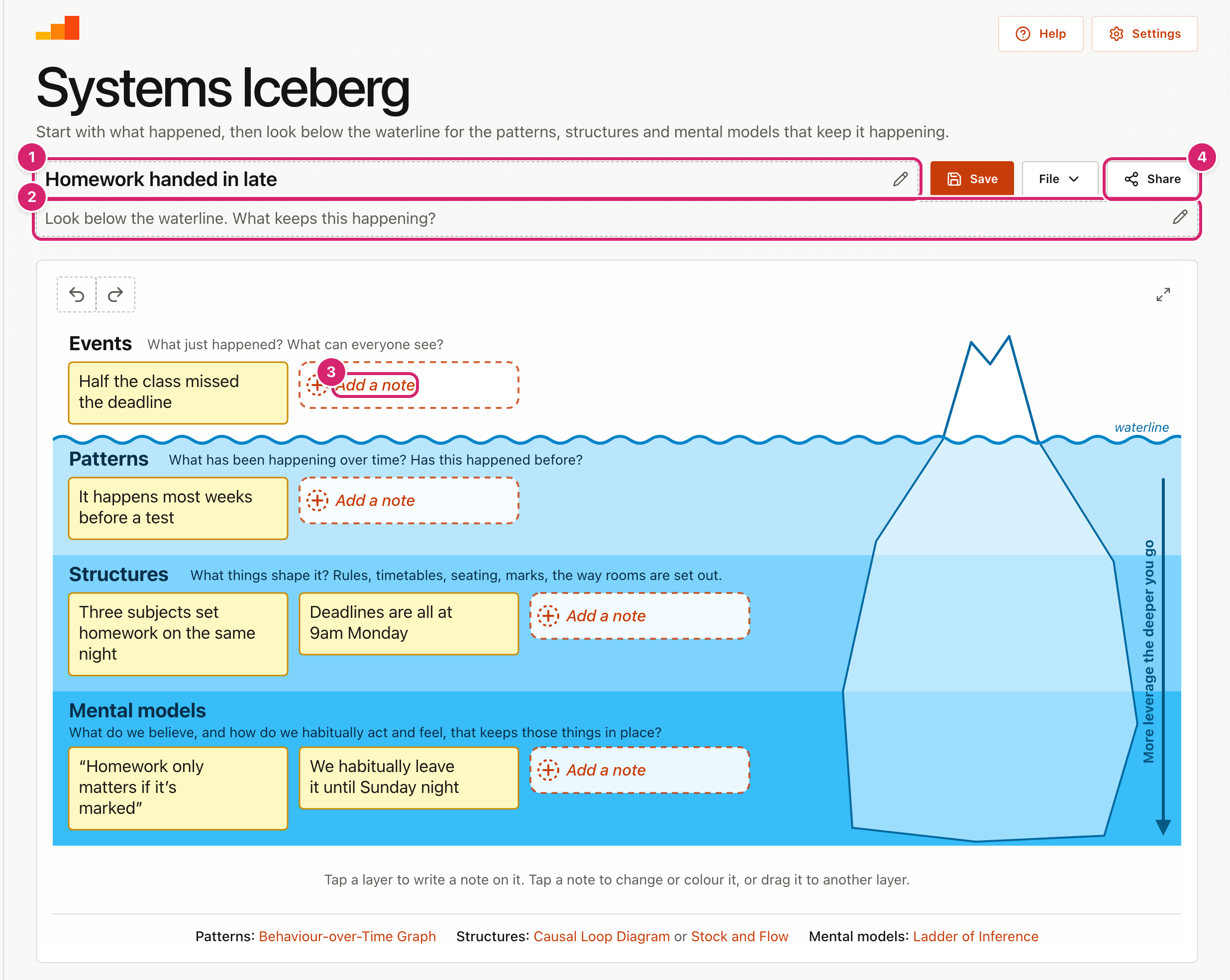
The tool opens on a worked example, "Homework handed in late". Read it with the class first, then make your own.
- Open File, select New blank diagram, and confirm.
- Select the title 1 and type what the iceberg is about.
- Select the line under it 2 and write the question or task for the class.
- Select + Add a note on Events 3, or any empty space on that layer, and write what happened. Press Enter to add it.
- Work down through Patterns, Structures and Mental models in the same way.
- Select Share 4 to send it to students.
Start from an example
Open File and select Examples for 8 ready-made examples for ages 8 to 18, in tutor time, maths, English, history, geography, science, PE, and music and drama. They run from word problems left blank to the Great Fire of London. Each one shows its age range and its question. Select a subject to narrow the list, then Open to use one. It replaces what is on screen, and Undo brings your work back.
Work down the layers
Each layer has a question to prompt the class.
- Events: What just happened? What can everyone see?
- Patterns: What has been happening over time? Has this happened before?
- Structures: What things shape it? Rules, timetables, seating, marks, the way rooms are set out.
- Mental models: What do we believe, and how do we habitually act and feel, that keeps those things in place?
These follow the CSF version of the iceberg. Structures are the tangible things people make, such as rules, timetables, measures and procedures. Mental models are our habits of thought, action and feeling, which is why "We habitually leave it until Sunday night" sits there in the example next to a belief. The two layers are always tangled together: the timetable shapes our habits, and our habits keep the timetable in place.
Start at the tip with the event, then go down one layer at a time. The deeper the layer, the more it explains, and the more a change there achieves. On a wide screen an arrow down the right-hand edge says so: more leverage the deeper you go. Telling a class off for late homework deals with one event. Moving homework nights so subjects stop clashing changes a structure, and the pattern with it.
Under the board, links open another tool for a closer look at one layer: a Behaviour-over-Time Graph for a pattern, a Causal Loop Diagram or Stock and Flow for a structure, and the Ladder of Inference for a mental model.
Write and change notes
- After you press Enter, a new note opens on the same layer so you can keep writing. Press Enter on an empty note to stop. A layer holds up to 8 notes.
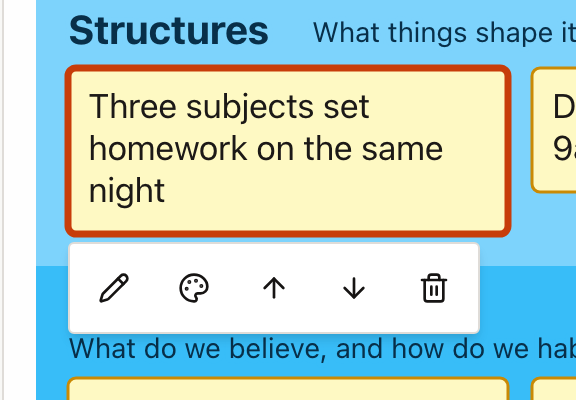
- Select a note to show its toolbar. From left to right the buttons edit the note, colour it, move it up a level, move it down a level, and remove it.
- There are six colours, plus none. Use them to group ideas or show who wrote what.
- Once a note has a colour, a key appears under the board. Select What does red mean? (or whichever colour) and type what that colour stands for, such as "My ideas" or "Facts we checked". The key travels with the link and the download, and a starter keeps any meanings you gave.
- Drag a note onto another layer, or to another place on its own layer. The target layer lights up while you drag.
Use your own words for the layers
Select a layer's name to rename it, and its question to reword it. Use your school's own words, or simpler ones for a younger class, such as "What happened" and "Why we think it happens". Press Enter when you are done. The names and questions travel with any link you share, and in a starter they are locked.
Share, save and download
- Share offers two kinds of link. A starter for students locks your title, task and any notes already written; students add their own around them. An exact copy shares the iceberg as it is, for handing work back or sending to a colleague.
- Save keeps a copy on this device under a name you choose. It reads Saved while the screen matches a saved copy. To find it again, open File and select Open a saved diagram. You can rename or delete saved copies there too, and deleting asks first.
- To download the drawing, open File and select Picture (PNG), for slides or Drawing (SVG), to edit or print large.
- Full screen is the button with two arrows in the top-right corner of the drawing. The tool then fills the screen, which suits the board. Press Esc, or select it again, to go back.
- Undo and Redo are the two curved arrows at the top left of the drawing. Undo takes back your last change, and Redo puts it back. A whole drag counts as one change, and so does a word typed in one go. With a keyboard, press Ctrl+Z (⌘Z on a Mac) to undo, and Ctrl+Y (⇧⌘Z) to redo. In a box you are typing in, those keys undo the typing instead.
- To start again, open File and select New blank diagram. It asks first. If you change your mind, select Undo.
Tips
- Do the first one together. Fill in the event as a class, then let pairs work on the lower layers with a starter link.
- Expect the bottom layer to be hard. Mental models are rarely said out loud. Ask "What would someone have to believe for this to seem normal?" and "What do we usually do, or feel, without thinking about it?"
- Put quotes on the bottom layer. Beliefs often sound like something a person would say, as in the example's "Homework only matters if it's marked". Habits are worth writing too, as in "We habitually leave it until Sunday night".
- On a projector, keep notes short. A few words read better from the back than a full sentence.
Troubleshooting
I removed something by mistake. Select Undo straight away, as many times as you need. It works back through every change since the page opened, including starting a new one.
Selecting a layer does nothing. The layer may already have 8 notes. Remove one, or move it to another layer. If a note is selected, the first tap only closes its toolbar.
Students cannot change some notes. They opened a starter link, which locks your notes, title and layer names. Send An exact copy if they should be able to change everything.
My iceberg has gone. It is kept in this browser only. Another browser or device will not have it unless you saved it and turned on sync, or restored a backup there.
The share link says the iceberg is too big. Everything travels inside the link, so very long notes can make it too long. Shorten some notes or remove a few.