In the Stock and Flow tool, the water in the bath is a stock: something that builds up or runs down, such as energy, trust or friendships. What fills it goes by the tap, and what drains it goes by the plug. Turn the tap on and the water shows what happens. A Year 9 class might fill the tap with "A good night's sleep" and the plug with "Gaming late at night", then watch whether their energy for school rises or falls.
Where your data goes
Your bath is kept in this browser as you work, so it is still there when you come back. Save keeps a copy under a name you choose. Saved copies are included in Backup & Restore, and in sync if you have turned it on. A share link holds the whole bath, so nothing is uploaded and nobody needs an account. If you clear the browser's data, you lose anything you have not backed up.
Quick start
The tool opens on a worked example, "My energy for school".
- Open File, select New blank bath, and confirm.
- Type a title and a question for the class at the top of the page.
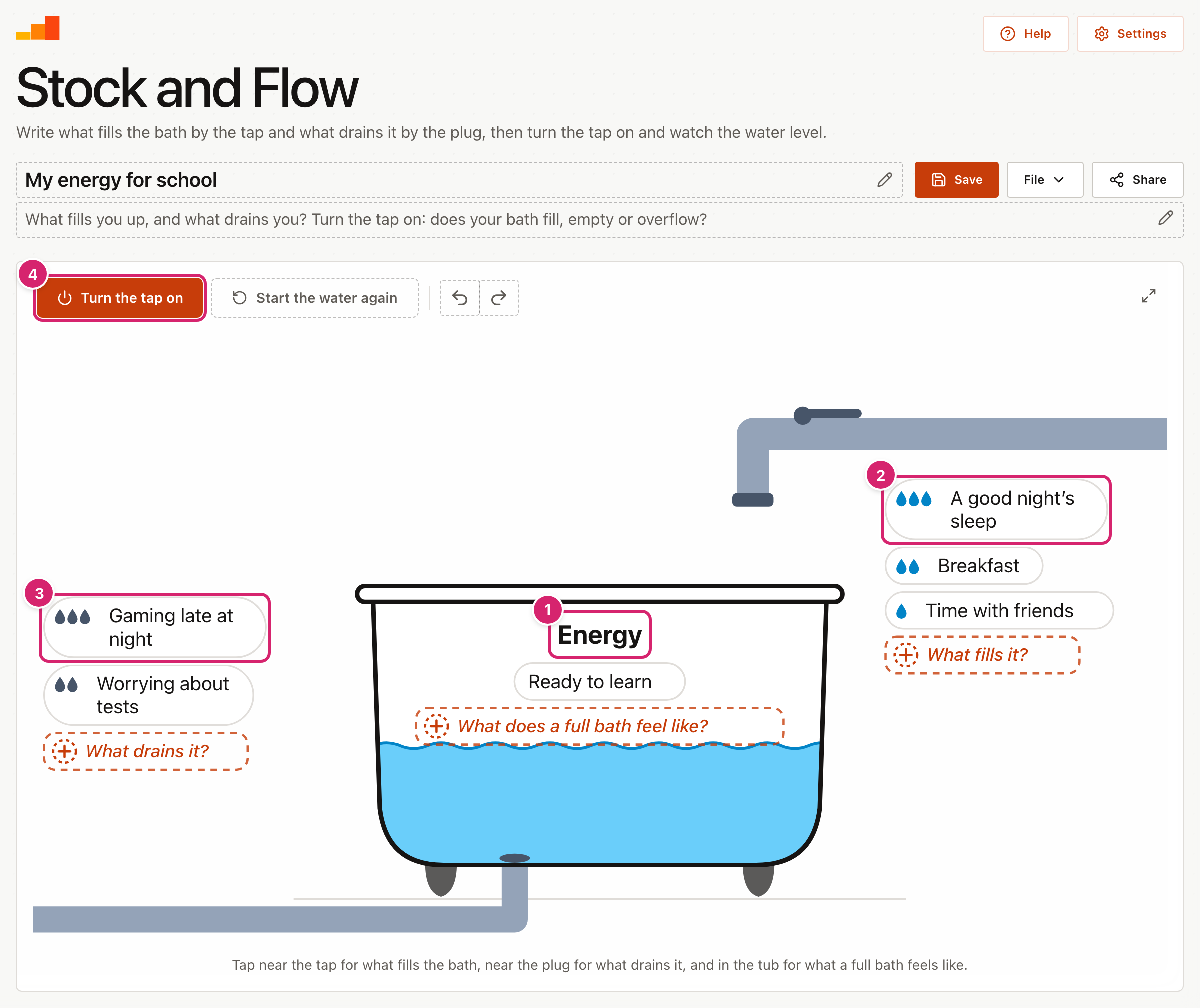
- Select the words on the side of the tub 1 and name what the water stands for. On a blank bath they read "What is in the bath?".
- Select near the tap 2 and write something that fills the bath. Choose how much it adds.
- Select near the plug 3 and write something that drains it. Choose how much it takes away.
- Select Turn the tap on 4 and watch the water.
Start from an example
Open File and select Examples for 12 ready-made examples for ages 8 to 18, in tutor time, maths, science, geography, history, English, languages, PE and computing. They run from saving for a bike to carbon dioxide in the atmosphere, and some start with the bath nearly full or nearly empty. Each one shows its age range and its question, and many add a note for teachers, such as a worked answer. Select a subject to narrow the list, then Open to use one. It replaces what is on screen, and Undo brings your work back.
Write what fills and drains the bath
There are three places to write, each with a dashed prompt.
- Near the tap, What fills it?, for things that add to the stock.
- Near the plug, What drains it?, for things that take away from it.
- Inside the tub, What does a full bath feel like?, for what it is like when the stock is high, such as "Ready to learn". The stock itself is the water, named on the tub.
Type and press Enter, and the next box opens straight away. Press Enter on an empty box to stop. Each place holds up to 5 items.
When you write by the tap or the plug, a small toolbar asks how much it adds or takes away: a little, some or a lot, shown as one, two or three drops. The tap and its stream grow with everything written by the tap, and the drain pipe grows with everything written by the plug. You can see which side is stronger before the water moves.
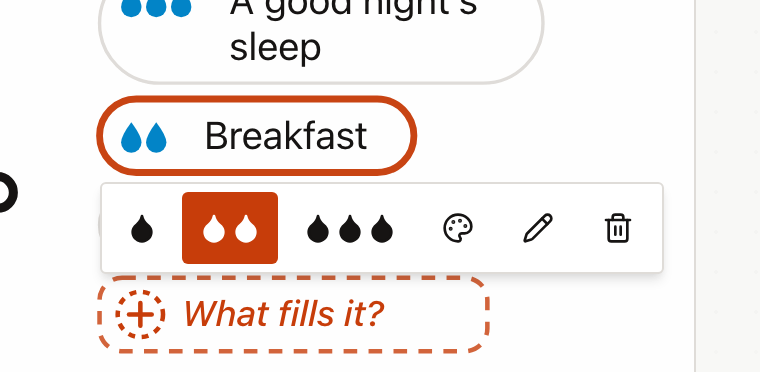
Select an item later to change its amount, give it a colour, edit it or remove it. Colours help group ideas, or show who wrote what.
Watch the water
Select Turn the tap on. A sentence beside the buttons says what is happening.
- The water rises when more flows in than drains out.
- It falls when more drains out than flows in.
- It holds steady when the two balance.
- It overflows down the sides onto the floor when the bath is full.
- It empties when everything drains away.
There are no numbers on purpose. Change an item while the tap is on, for example turn "Gaming late at night" down to a little, and the water changes straight away. Select Turn the tap off to pause, and Start the water again to put the level back where it began. Most baths start a little under half full. Some examples start fuller or emptier, such as stamina at the start of a match.
The key idea for students is that a stock changes only when what flows in and what flows out are out of balance, and then it changes gradually. That is why stocks like trust or energy are slow to build and slow to run down. One good night's sleep does not refill a week of late nights.
Share, save and download
- Share offers two kinds of link. A starter for students fixes your title, the name of the bath and everything already written; students add their own. An exact copy shares the bath as it is.
- Save keeps a copy on this device under a name you choose. It reads Saved while the screen matches a saved copy. To find it again, open File and select Open a saved bath. You can rename or delete saved copies there too, and deleting asks first.
- To download the drawing, open File and select Picture (PNG), for slides or Drawing (SVG), to edit or print large.
- Full screen is the button with two arrows in the top-right corner of the drawing. The tool then fills the screen, which suits the board. Press Esc, or select it again, to go back.
- Undo and Redo are the two curved arrows at the top left of the drawing. Undo takes back your last change, and Redo puts it back. A whole drag counts as one change, and so does a word typed in one go. With a keyboard, press Ctrl+Z (⌘Z on a Mac) to undo, and Ctrl+Y (⇧⌘Z) to redo. In a box you are typing in, those keys undo the typing instead.
- To start again, open File and select New blank bath. It asks first. If you change your mind, select Undo.
Tips
- Ask for a prediction first. Before you turn the tap on, ask the class whether the bath will fill, empty or overflow.
- Try other stocks. Trust in a friendship, the class's reputation or money for a school trip all work as baths.
- Notice flows that act on other flows. Some things do not drain the bath directly. "Gaming late at night" mostly shrinks the inflow from "A good night's sleep". On the bath it sits by the plug, which is close enough for a first picture. With an older class, ask what it really changes, and draw that link in a causal loop diagram.
Troubleshooting
I removed something by mistake. Select Undo straight away, as many times as you need. It works back through every change since the page opened, including starting a new one.
Start the water again is greyed out. The water is already at its starting level and the tap is off. There is nothing to reset.
Selecting near the tap does nothing. That place may already have 5 items. Remove one first. If an item is selected, the first tap only closes its toolbar.
My bath has gone. It is kept in this browser only. Another browser or device will not have it unless you saved it and turned on sync, or restored a backup there.